What It Does and What It Does Not
The diagram below shows the overall architecture of EDB2MySQL: the main components, how they relate to each other, and the role of each in the conversion and migration process.
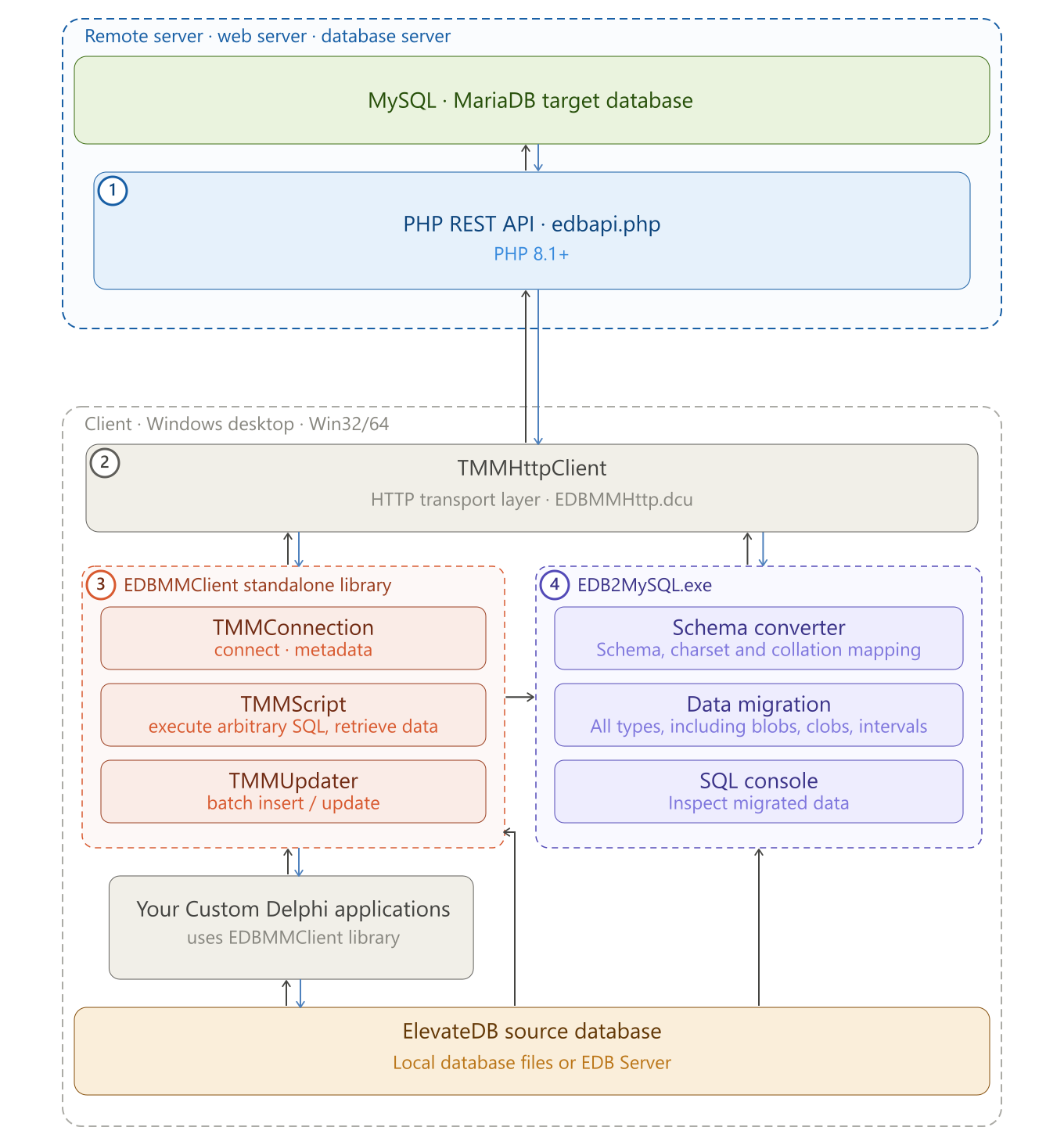
| # | Module Description | Included |
|---|---|---|
| 1 | PHP REST API
(edbapi.php) — the server-side gateway deployed on your
web/database server. Receives requests from the client and executes SQL
against the MySQL/MariaDB target. |
Yes |
| 2 | TMMHttpClient
(EDBMMHttp.dcu) — the HTTP transport layer. Handles all
communication between the client and the PHP REST API. |
Yes |
| 3 | EDBMMClient standalone
library (EDBMMClient.dcu) — the client-side Delphi
library (TMMConnection, TMMScript,
TMMUpdater). Can be used independently in any Delphi
application to access MySQL/MariaDB via the API after migration. |
Yes |
| 4 | EDB2MySQL.exe — the desktop conversion and migration application. Uses the EDBMMClient library and communicates with the server via its own HTTP pipeline. | Yes |
All four modules are included and ready to use with a single purchase.
Note: The source EDB database is never modified in the conversion/migration process. All operations on the EDB side are strictly read-only. It will never modify the source EDB database, even if the process does not complete or crash.
What it does
- Converts the full EDB schema — tables, columns, indexes, primary and foreign keys, check constraints, views, triggers, stored procedures and functions, including object Descriptions — to a MySQL/MariaDB DDL script ready to execute on the target server.
- Maps EDB data types and collations to their closest MySQL/MariaDB equivalents, with configurable collation overrides.
- Migrates row data from all EDB tables to the target server, including BLOB and CLOB columns and all INTERVAL types, with resume support for interrupted runs.
- Provides a built-in SQL Console for verifying the result on the target server without leaving the application.
- Provides the EDBApiClient library for ongoing independent MySQL/MariaDB access from any Delphi/ElevateDB application after the migration: executing SQL queries and receiving results locally, and writing data to the server in batch (INSERT, UPDATE, UPSERT).
What it does not
- Procedure, function, and trigger bodies are not
converted. EDB uses its own SQL/PSM dialect which is not
compatible with MySQL/MariaDB. For procedures and functions, the
parameter list — names, modes
(
IN/OUT/INOUT), and data types — is fully generated and converted. The body, however, is replaced with a syntactically valid stub (DO 0;/RETURN NULL;) so the script executes immediately; the original EDB body is preserved as a commented reference at the end of the script. A manual rewrite in MySQL/MariaDB syntax is required for each routine and trigger. - Some DDL constructs may need manual adjustment. Features with no direct MySQL/MariaDB equivalent — such as multiple identity columns per table, non-standard identity increments, or generated columns using EDB-specific expressions — are emitted with warnings and may require manual editing before the script runs cleanly.
- The SQL Console is not a database management tool. It is scoped to migration verification — querying the target server to confirm that data and schema arrived correctly.